New Clip Creator feature is now Live in ScoutUs College!
Check out the new video editor now available in our app! You can create funny clips, highlight reels of your best plays, and so much more!
Your best plays deserve more than a raw upload. With Clip Creator, athletes can turn any video into a polished, share-ready clip without ever leaving ScoutUs. Everything happens right in your browser, on desktop or mobile web, so there's nothing to download and no extra apps to juggle.
Start editing in seconds
Clip Creator is always one click away, wherever you already are in ScoutUs. Pick a video, choose the format that fits where you'll share it, and you're ready to go.
- Open it from the sidebar, the "Clip Creator" card on your profile, the My Files tab, your file library or straight from a chat.
- Choose a vertical (9:16) format for stories or a horizontal (16:9) format for full highlights.
Edit like a pro
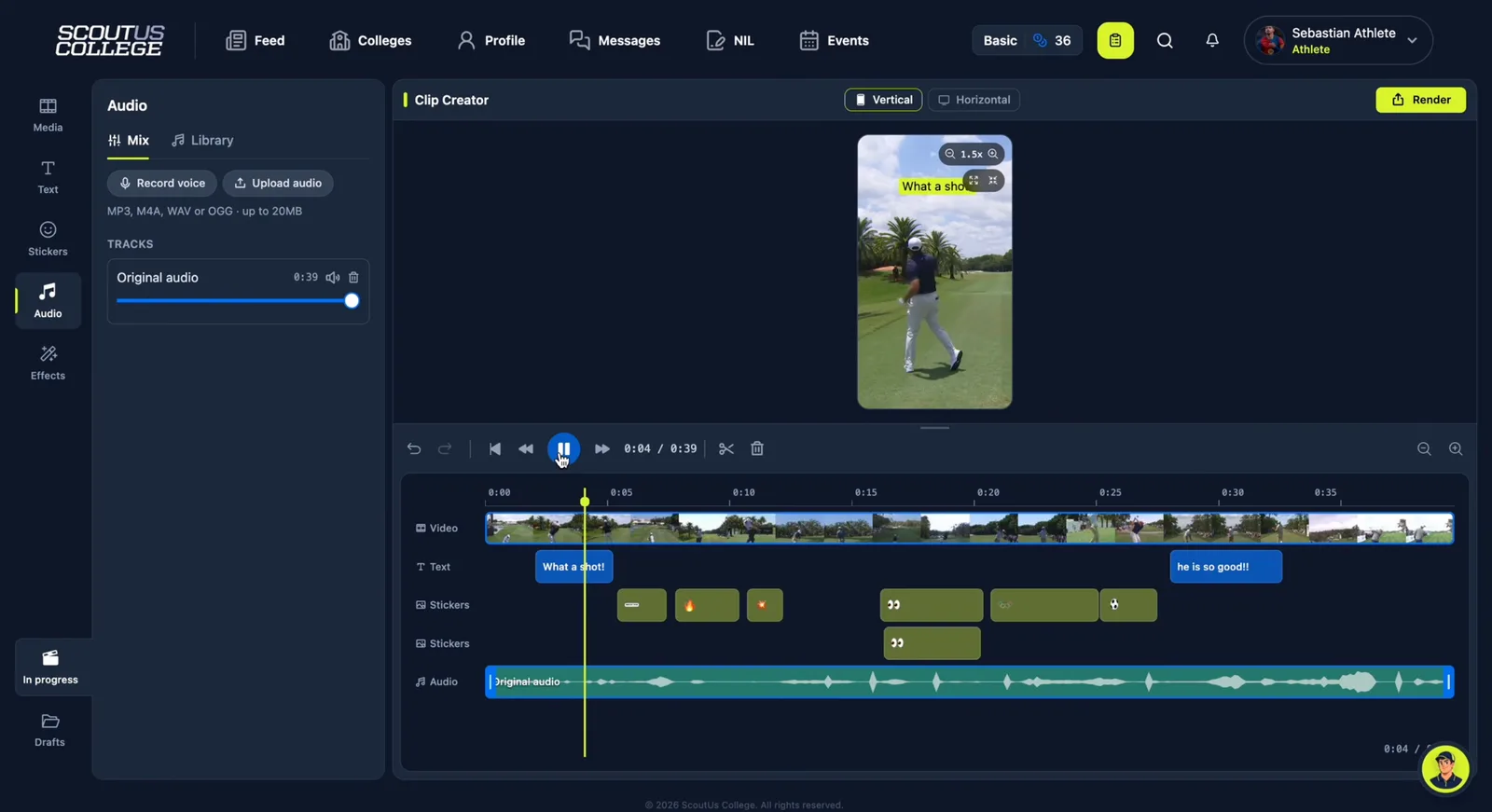
The timeline puts you in full control of every second of your clip. Cut it down to the moments that matter, then build on top of it with text, stickers, music and effects until it looks and sounds exactly the way you want.
- Timeline: trim, split at the playhead and delete parts of the video, zoom in for precise edits, and drag text, stickers, images and audio to place them in time.
- Undo and redo: go back and forward on any change.
- Reframe: zoom in or out, fill the frame or fit the whole video.
- Text: multiple fonts, style presets, colors, background, alignment, size, uppercase and underline. Move, resize and rotate it anywhere on the video.
- Stickers: sports badges, markers, emoji and GIFs, with search. Upload your own images or reuse ones you added before.
- Audio: music and sound effects from the library, your own audio (MP3, M4A, WAV or OGG, up to 20MB), voiceovers, the clip's original audio, and volume or mute for each track.
- Effects: 16 color filters, including Clarendon, Juno, Valencia and Inkwell.
Never lose your progress
You don't have to finish a clip in one sitting. Clip Creator keeps your work safe while you edit, so you can come back later and pick up right where you left off.
- Your work is saved automatically as you edit.
- Name, rename, duplicate and delete drafts from the Drafts panel.
- Drafts are stored in your browser, so they stay on the device where you created them.
- Flatten: burn the text, stickers and audio into the video and keep editing on top of the result.
Share it everywhere in one step
Once your clip is ready, getting it in front of coaches and fans takes a single step. Export it, then download it or publish it to every place that matters at once.
- Export with a progress indicator and an estimated time left.
- Publish the same clip as a post, a story and a profile highlight, or send it to your contacts, all at once.
- Credits for library music and stickers are added to the bottom of the video automatically.
- Free plans include a ScoutUs watermark and a limited number of renders. Check out our plans to remove the watermark and render without limits.
Don't have an account yet? Create one for free to start editing your clips, or log in if you're already part of ScoutUs.
Ready to turn your best plays into a highlight? Give Clip Creator a try.